Accessing Port Forwards from Local Networks
By default, pfSense® software does not redirect internally connected devices to
forwarded ports and 1:1 NAT on WAN interfaces. For example, if a client on LAN
attempts to reach a service forwarded from WAN port 80 or 443, the
connection will hit the firewall web interface and not the service they intended
to access. The client will be presented with a certificate error if the GUI is
running HTTPS, and a DNS rebinding error since the GUI rejects access for
unrecognized hostnames.
Split DNS and NAT reflection are two techniques which allow clients to reach these types of resources from local networks. Split DNS allows clients to avoid passing this traffic through the firewall, while NAT Reflection employs techniques to redirect these connections through the firewall. Split DNS is the best practice because it allows for retaining of the original source IP address and avoids unnecessarily looping internal traffic through the firewall. Both techniques are explained in this document.
Method 1: Split DNS
Split DNS is a configuration where internal and external clients resolve hostnames differently. Split DNS is the best practice to solve this problem, and it is a much more elegant solution than NAT reflection.
In this scenario, internal clients access resources by hostname, not IP address. Clients on the local network resolve that hostname to the actual local IP address of the server, and not the external (e.g. WAN) IP address as others outside the network would see.
For this to work using the DNS Resolver or Forwarder in pfSense software, clients must use the IP address of the firewall as their primary DNS server.
Note
If the clients all use some other internal DNS server not on the firewall, such as Active Directory, split DNS can still work. Configure the internal DNS server similarly to what is described in this section.
Example:
www.example.comresolves to public IP address1.2.3.4, which is the WAN IP address of the firewall.The firewall is configured to forward port
80on1.2.3.4to port80on192.168.1.5, the internal web server.Override
www.example.comusing Services > DNS Resolver (or DNS Forwarder, if that is active instead) and pointwww.example.comto192.168.1.5
Screenshots that show the above in practice:
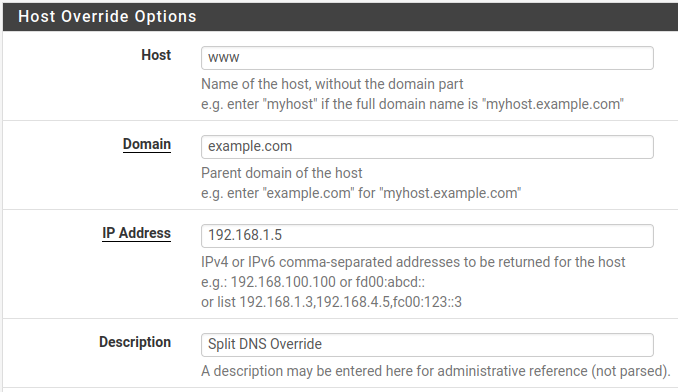
Adding a DNS Resolver host override for split DNS

Split DNS entry in the list of host overrides
Method 2: NAT Reflection
To access ports forwarded on the WAN interface from internal networks using NAT reflection, the feature must be explicitly enabled:
Navigate to System > Advanced, Firewall & NAT tab
Configure the following options in the Network Address Translation section of the page:
- NAT Reflection mode for port forwards:
Pure NAT
Pure NAT mode is the best type of NAT reflection, but it may not work for all scenarios. See NAT Reflection mode for Port Forwards for details on each of the NAT reflection modes.
- Enable NAT Reflection for 1:1 NAT:
Checked
- Enable automatic outbound NAT for Reflection:
Checked
Click Save
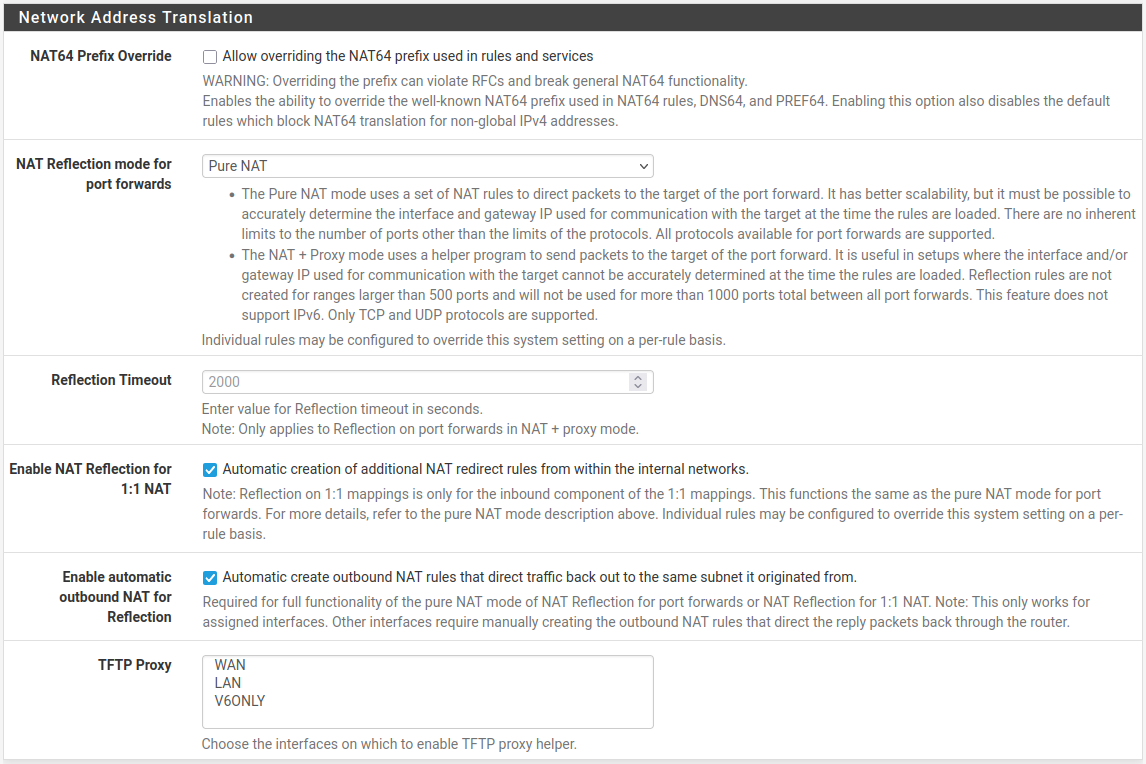
NAT Reflection Settings