Instance List Filter & Sort
The list of instances on the dashboard can be filtered and sorted to locate and manage items easier. The options to filter and sort the list are in the upper right area of the dashboard.
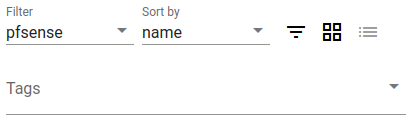
Instance List Filter & Sort Controls
In that area, the following options are available:
- Filter
This drop-down menu allows filtering the list by item type.
- Sort By
This drop-down menu sorts the items on the dashboard by a specific attribute.
The current sort options are:
- Name
Sorts by instance hostname.
- State
Sorts by online/error status.
- Address
Sorts by IP address.
- Type
Sorts by device type.
- Tags
Enter a tag name to filter the list so it only shows items matching a specific tag or multiple tags.
- Sort Order
The sort order icon toggles between ascending (
 ) and
descending (
) and
descending ( ) sort order.
- Tile View
Clicking the
 icon switches the dashboard to tile view,
which is the default.
icon switches the dashboard to tile view,
which is the default.- Detail View
Clicking the
 icon switches the dashboard to a detailed
list view.
icon switches the dashboard to a detailed
list view.