Determine Netgate 4200 Firmware Type
The Netgate® 4200 Desktop Firewall Appliance has two variations which are primarily differentiated by the platform firmware.
Note
Though UEFI platform firmware is not technically a “BIOS” in the traditional sense, it is still commonly referred to as a “BIOS” in practice since end users are familiar with that term.
The two firmware variants are:
AMI
Slim Bootloader (SBL)
Note
SBL boots much faster than AMI. Connect to the console before booting the device to ensure the console receives all possible output.
Dashboard Widget Method
Log into the pfSense® Plus GUI and check the BIOS section of the System Information Dashboard widget. The contents of that widget section contain information which identifies the hardware variant.
Netgate 4200 devices running AMI firmware will appear as follows:

System Information Dashboard widget on Netgate 4200 device with AMI firmware
Netgate 4200 devices running SBL will appear as follows:

System Information Dashboard widget on Netgate 4200 device with SBL
Boot Output Method
When the device boots, the first output from the firmware informs users how to enter the firmware setup, among other information. This output is different on each type of firmware.
Netgate 4200 devices running AMI firmware will appear as follows:
Version 2.22.1285. Copyright (C) 2024 AMI
BIOS Date: 02/01/2024 15:18:05 Ver: 2AZRT81
Press <DEL> or <ESC> to enter setup.
Netgate 4200 devices running SBL briefly show initialization output followed by a prompt.
SBL initialization appears as follows:
Intel Slim Bootloader
SBID: VAL-SL00
ISVN: 001
IVER: 001.000.002.000.00001
BOOT: BP0
MODE: 1
BoardID: 0x09
Memory Init
Silicon Init
MP Init
PCI Enum
ACPI Init
VBT not found 80000003
The SBL boot prompt appears as follows:
F2 or Down      to enter Setup.
F7              to enter Boot Manager Menu.
ENTER           to boot directly.
Firmware Configuration Screen
The firmware setup screen is much different for each firmware type. When the console displays the setup screen, the two types can be differentiated by comparing against the following images:
Netgate 4200 devices running AMI firmware will appear as follows:
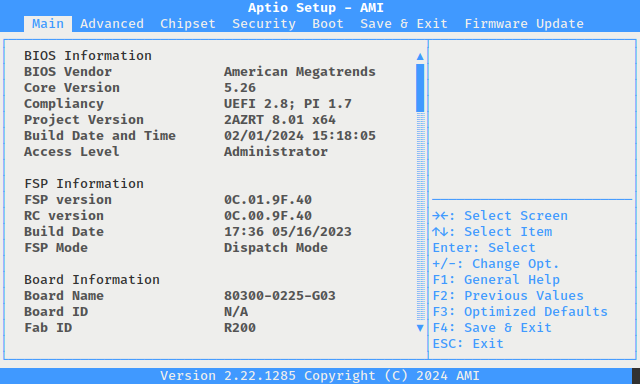
Firmware Configuration Screen on AMI firmware
Netgate 4200 devices running SBL will appear as follows:
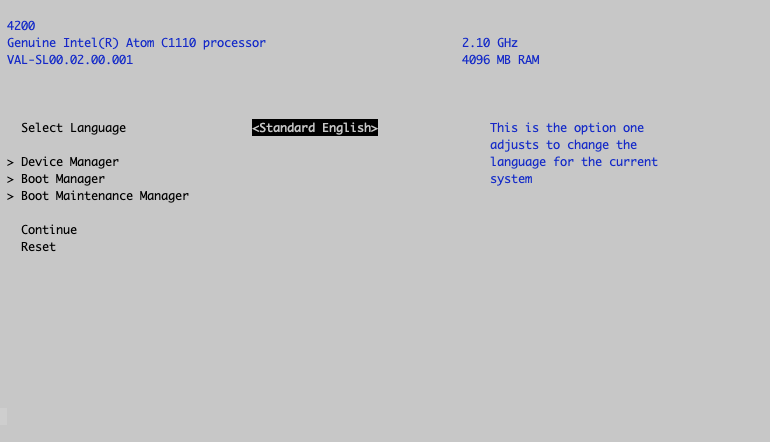
SBL Firmware Configuration Screen
Hardware Sticker Method
Each device has a unique Serial Number (SN) printed on a sticker on the
underside of the hardware. This serial number value can help differentiate
between firmware types. The format of the serial number is MMWWYYSSSS where
each component has the following meanings:
MMManufacturer code
WWWork week
YYYear
SSSSSerial number for each manufacturing lot starting with
0001
Netgate 4200 devices with Slim Boot Loader (SBL) entered full production during
the 8th week of 2025. Netgate 4200 devices with serial number 2008250253 and
later contain SBL firmware. Devices manufactured before that point contained AMI
firmware.
Note
A limited number of Netgate 4200 devices with serial numbers corresponding to
the 7th week of 2025 also received SBL. The first 6 digits of those serial
numbers will be 200725.