Updating the Platform Firmware
Warning
The update procedure for SBL is still under development.
Download the firmware file for the Netgate 5200 from the Netgate Store, e.g.
FwuImage.binCopy the firmware file to a USB memstick formatted as DOS (FAT)
Insert the memstick into the top USB port on front the Netgate 5200
Boot or reboot the Netgate 5200
Wait for the firmware prompt to appear

SBL Firmware Prompt
Press
F7orDELto enter the boot manager menu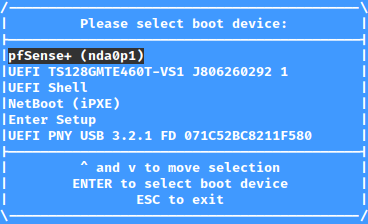
SBL Boot Manager Menu
Use the up/down arrow keys to highlight UEFI Shell
Press
Enterto boot into the UEFI ShellPress
Escwhen prompted to cancel the automatic UEFI Shell boot scriptEnter
fwupdateat the prompt and pressEnterFollow the output as the update completes
Power off the device after the update completes
Remove the USB memstick
Power on the device and allow it to boot
Tip
After updating, a good practice is to check and confirm the correct boot order.